Protect Viewport
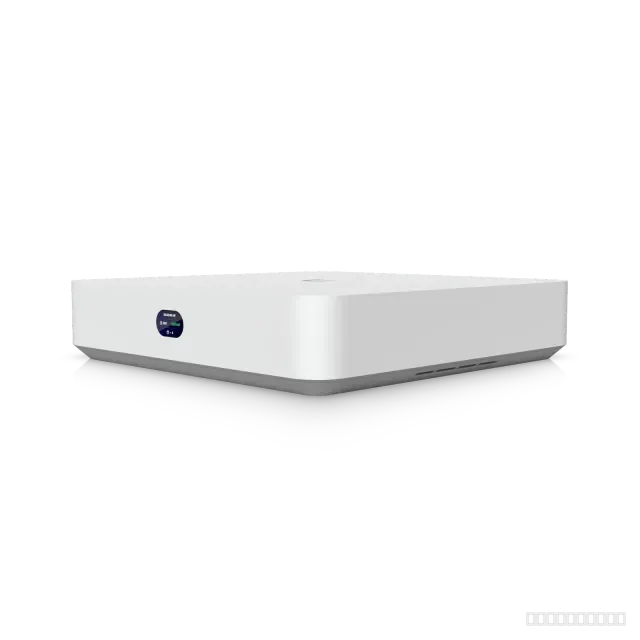
Easy-to-use hub for viewing Protect camera feeds on an HDMI display.
Protect Viewport installation service
We install and configure the Protect Viewport on site and hand it over documented. Installation across Germany by quote — we reply the same working day.
- VLANs for office, guests, phones and cameras
- Clean patching with labelled ports
- Firmware check and secured management access
- Configuration backup and port documentation
- Charged by time, minimum one hour; the amount, travel and material are in the quote.
Payment
- Transfer
- Invoice
- Pay after installation and handover
- SSL-encrypted connection
Installed across Germany
By appointment, on site
Reply the same working day
Email, phone or WhatsApp
Installation by quote
Written quote first
Documented handover
Settings and cabling on paper
Product overview
Easy-to-use hub for viewing Protect camera feeds on an HDMI display.
Who it is for
- Features
- Flexible mounting16-stream matrix view supportConnect and power using PoEHDMI video output up to 4K @ 30 FPS
Technical specifications
- Weight
- Without mount: 230 g (8.1 oz), With TV mount: 252 g (8.9 oz)
- Buttons
- (1) Factory reset
- Dimensions
- 157 x 52 x 37 mm (6.2 x 2.1 x 1.5")
- Power Method
- PoE
- Certifications
- FCC, IC, CE, Anatel: 06681-25-08356
- Mount Material
- Polycarbonate
- NDAA Compliant
- Yes
- ESD/EMP Protection
- Air: ± 8kV, contact: ± 4kV
Show all 15 specificationsShow fewer
- Enclosure Material
- Polycarbonate
- Networking Interface
- (1) GbE RJ45 port
- Max. Power Consumption
- 9.5W
- Ambient Operating Humidity
- 20 to 80% noncondensing
- Ambient Operating Temperature
- 0 to 40° C (32 to 104° F)
- Application Requirements · Mobile App
- UniFi Protect iOS™ and Android™
- Application Requirements · Web Application
- UniFi Protect
Questions about the Protect Viewport?
Ask before you order: compatibility, PoE budget, cabling or mounting. We reply the same working day.
Protect Viewport installation: installation and configuration
We install and configure the Protect Viewport on site and hand it over documented.
1Rack installation
Mounted, earthed and powered, with cable management so the rack stays serviceable.
2VLAN configuration
Office, guest, VoIP and camera traffic separated, trunks to the firewall and access points.
3Replacing an old switch
Old configuration read out and carried over, changeover planned to keep downtime short.
4Documentation
Port plan, VLAN list and configuration backup handed over.
What is included for this product
- VLANs for office, guests, phones and cameras
- Clean patching with labelled ports
- Firmware check and secured management access
- Configuration backup and port documentation
Price and process
Charged by time, minimum one hour; the amount, travel and material are in the quote.
Tell us briefly what should be installed and where. We reply the same working day and agree an appointment — installation across Germany.
Documents
Frequently asked questions
How is the Protect Viewport powered?
Over the network cable (Power over Ethernet): PoE. No socket is needed at the mounting point, but the switch must supply enough PoE budget — we check that before installation.
Can the Protect Viewport be installed outdoors or in unheated areas?
The manufacturer specifies protection Air: ± 8kV, contact: ± 4kV and an operating temperature of 0 to 40° C (32 to 104° F). We plan the mounting point and cable entry to match.
What does installing the Protect Viewport cost?
Charged by time, minimum one hour; the amount, travel and material are in the quote. For a firm figure, tell us the site and how many units.
Do you install outside Berlin?
Yes — installation across Germany, by appointment.
How quickly will I hear back?
The same working day. We do not offer a guaranteed response time; the appointment is scheduled by urgency.
Related products
More products we supply and install